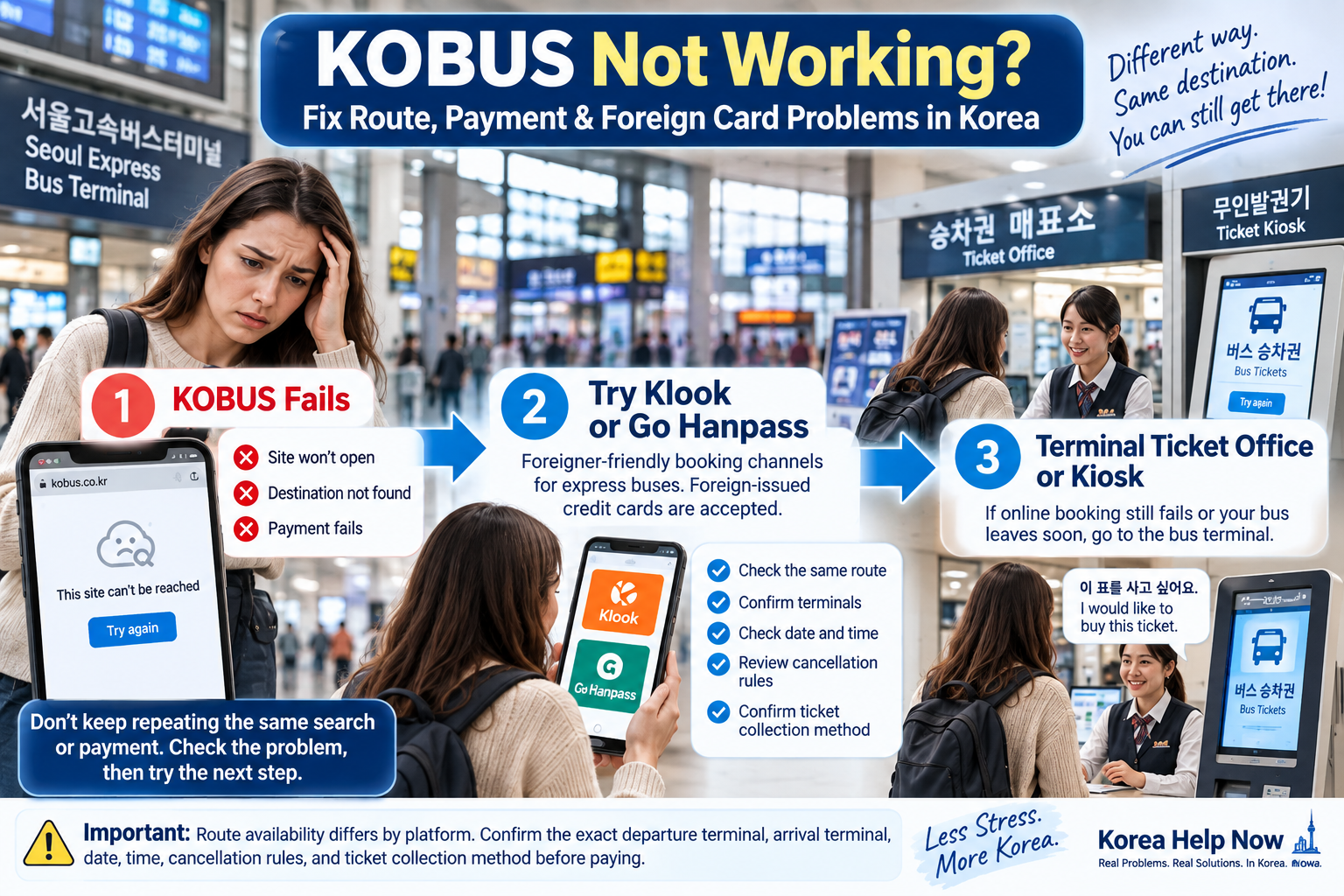
If KOBUS is not working, do not keep repeating the same search or payment.
First, check where the problem happens:
- Destination missing → check whether you need an intercity bus instead.
- Foreign card payment fails → check the payment methods shown, then confirm whether a reservation was actually created.
- KOBUS will not open → try another booking channel or buy the ticket at the terminal.
Korea has two main types of long-distance buses. KOBUS is used for express buses, while TXBus and BusTago are used for intercity buses. That means a destination missing from KOBUS does not necessarily mean there is no bus.
1. Your Destination Is Missing From KOBUS
Before assuming KOBUS is broken, check which type of bus you need.
Express bus → KOBUS
Intercity bus → TXBus or BusTago
Intercity buses cover many regional destinations and can use different terminals from express buses. Large cities may also have several bus terminals, so check the exact departure and arrival terminal names.
If KOBUS cannot find your destination, search the same destination on TXBus or BusTago before assuming there is no bus.
2. KOBUS Does Not Open
KOBUS is available in Korean, English, Japanese and Chinese. Korea Tourism Organization also notes that access can be restricted from some countries.
If the site does not load:
- Confirm that you are using the official KOBUS site.
- Try another browser or network.
- If you are outside Korea and it still does not open, do not spend too long refreshing the same page.
- Check whether your route is available through Klook or Go Hanpass.
- If you are already in Korea and your departure is close, go to the bus terminal.
The goal is to get your ticket, not spend an hour fixing one website.
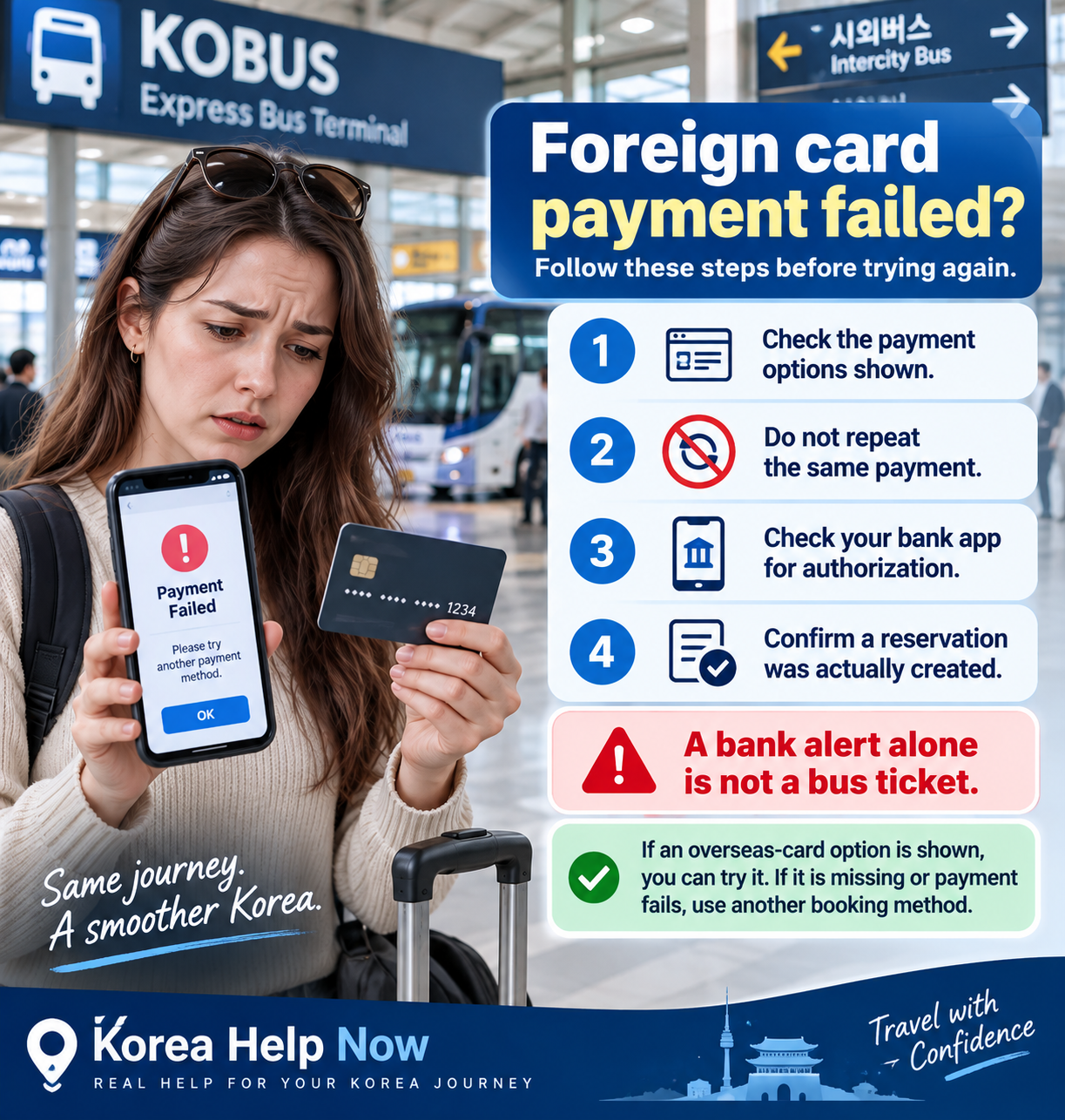
3. Your Foreign Card Payment Fails
Do not assume that every overseas-issued card will work for every KOBUS transaction.
Follow what the current booking screen actually shows:
Choose route → choose bus → choose seat → check the available payment methods
If an overseas-card option is shown, you can try it. If the option is missing or the payment fails, do not repeatedly submit the same payment.
Check your banking or card app for any authorization, then check whether KOBUS actually created a reservation.
A bank or card notification alone is not a bus ticket. You need a confirmed reservation or ticket with the route and travel details.
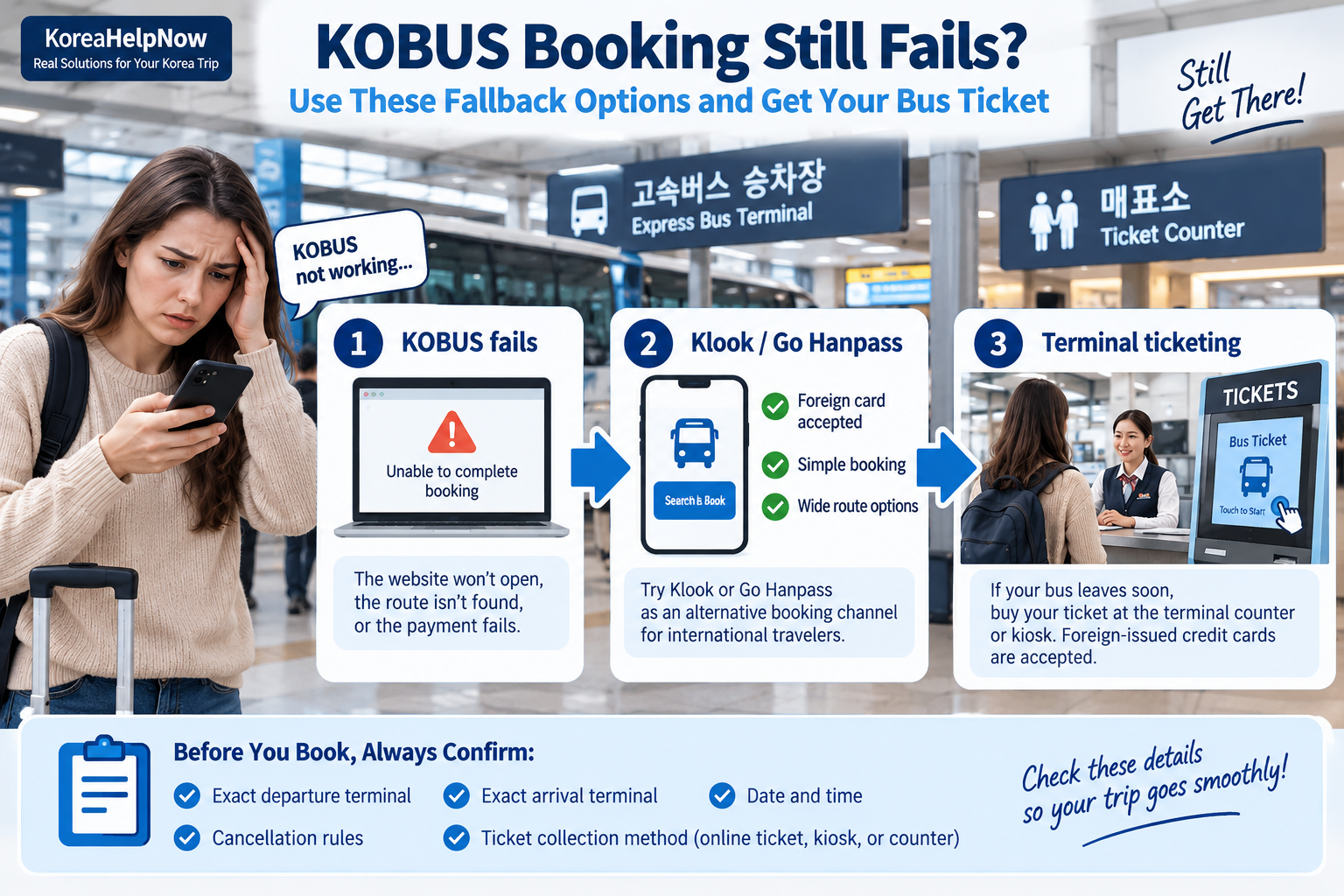
4. KOBUS Still Fails? Use a Fallback
Korea Tourism Organization lists Klook and Go Hanpass as booking options for international travelers and links them as affiliated bus-booking platforms.
Use this fallback order:
KOBUS fails → Klook / Go Hanpass → terminal ticketing
Route availability can differ by platform. Before paying, confirm:
- exact departure terminal
- exact arrival terminal
- travel date and departure time
- cancellation rules
- ticket collection or printing instructions
Do not book only because the city names look correct. Check the terminal names too.
5. Need the Bus Soon? Go to the Terminal
If your bus leaves soon, going to the terminal can be faster than continuing to troubleshoot online.
Korea Tourism Organization states that bus tickets can be bought at terminal ticket offices and kiosks and that credit-card payment is available.
For intercity buses, Korea’s Ministry of Land, Infrastructure and Transport specifically states that overseas-issued credit cards are supported for on-site ticket purchases across intercity routes.
At the terminal, show the staff your destination, date and preferred departure time.
이 표를 사고 싶어요.
I would like to buy this ticket.
해외카드로 결제할 수 있나요?
Can I pay with a foreign card?
If your route did not appear online:
KOBUS에서 이 노선이 안 나와요.
This route does not appear on KOBUS.
If pronunciation is difficult, show the route and travel details on your phone.
6. Save the Important Details Before Switching Methods
If something fails, save enough information so you do not have to start again from zero.
- a screenshot of the error
- departure and arrival terminals
- travel date and time
- selected bus or seat, if shown
- payment or bank authorization notice
- reservation number, if one was issued
Do not unnecessarily share or save an image showing your full card number. These details also make it easier to explain the problem to terminal staff or travel support.
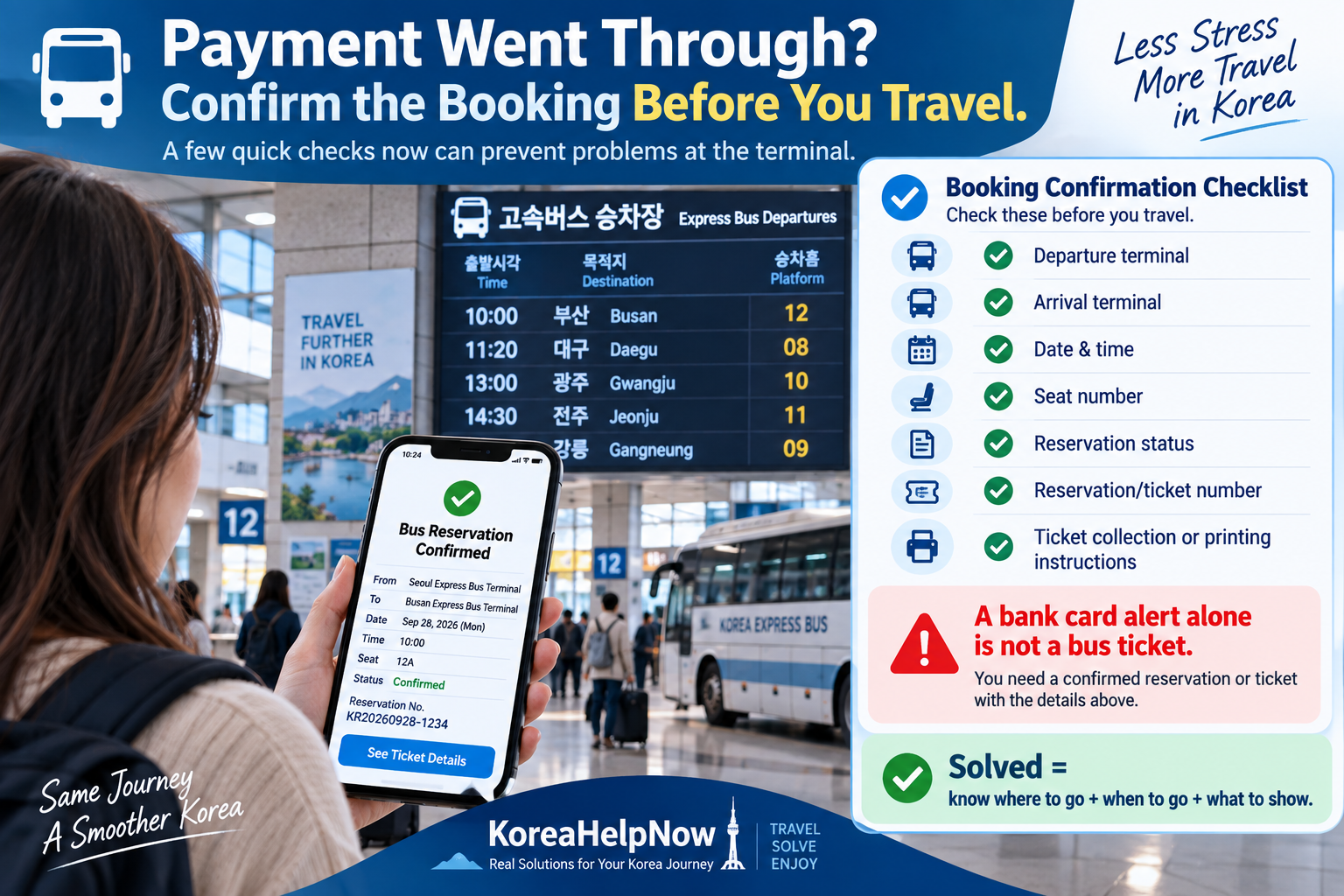
7. Payment Worked? Confirm the Booking Before You Leave
Do not stop at “Payment successful.”
Confirm:
- Departure terminal
- Arrival terminal
- Date and time
- Seat number
- Reservation status
- Ticket or reservation number
- Ticket collection or printing instructions
Korea Tourism Organization advises travelers to confirm online bookings and notes that, depending on the destination and booking method, a printed ticket may still need to be collected at the terminal.
At the terminal, also check the departure platform.
Your booking is solved only when you know:
where to go + when to go + what to show to board
Quick Decision Guide
Destination missing on KOBUS?
→ Check TXBus or BusTago.
KOBUS will not open?
→ Try another browser/network → Klook or Go Hanpass → terminal.
Foreign card rejected?
→ Check the payment methods shown → check whether a reservation exists → use another booking method if necessary.
Bus leaves soon?
→ Stop troubleshooting online and go to the terminal.
Payment succeeded?
→ Confirm the reservation, exact terminal and ticket instructions.
Need Help?
For general travel information and assistance, the 1330 Korea Travel Helpline provides phone and chat support for travelers. From within Korea, call 1330; from overseas, use +82-2-1330.
Before asking for help, prepare your route, travel date, departure time, terminal names and a screenshot of the problem.
FAQ
Can foreigners use KOBUS in English?
Yes. Korea Tourism Organization lists KOBUS in Korean, English, Japanese and Chinese. Access may still be restricted from some countries.
Why can’t I find my destination on KOBUS?
The route may use an intercity bus rather than an express bus. Check TXBus or BusTago before assuming no bus is available.
Does KOBUS accept foreign credit cards?
Check the payment methods currently displayed for your specific booking rather than assuming every overseas-issued card will work. If payment fails or an appropriate option is unavailable, use another booking channel or terminal ticketing.
Can I buy a Korean bus ticket at the terminal?
Yes. Bus tickets can be purchased at terminal counters or kiosks. For intercity buses, MOLIT specifically confirms support for overseas-issued credit cards for on-site ticketing.
Can I board with only my online reservation?
Not always. Depending on the route and booking method, you may need to collect or print a ticket at the terminal. Check the instructions attached to your reservation.
Sources
- Korea Tourism Organization — Express Bus & Intercity Bus
- Korea Tourism Organization — Bus booking options for international travelers
- Ministry of Land, Infrastructure and Transport — Foreign Credit Cards Are Available for Intercity Buses
- Korea Tourism Organization — 1330 Travel Helpline & Complaint Center
Leave a Reply